
Your procedure is approved. But does it still describe how your team should work?
Since its release, you may have changed your development tools, introduced a new supplier or reassigned responsibilities. Findings from a complaint investigation may have highlighted a gap in your processes. Your development team may have outgrown the current process and needs a better way to manage larger projects. Yet the approved procedure in Confluence still contains the old instructions.
For medical device companies, outdated documentation can affect how people develop, test, manufacture and support a device. Keeping documents current is part of maintaining a quality management system that works in practice.
SoftComply Document Manager brings advanced document management into Confluence Cloud, including automated periodic reviews that help teams keep approved documents current, assign responsibility and record review outcomes.
Document management continues after approval
Medical device companies invest considerable effort in reviewing and approving procedures before release. Those documents then guide activities such as design and development, software verification, supplier evaluation and complaint handling.
But an approval records a decision at a particular point in time. It does not establish that the content will remain suitable indefinitely.
Consider a software verification procedure that references a testing tool your team has replaced. The procedure remains approved, but its instructions for recording test results no longer reflect the workflow. Different team members may adopt different approaches, leaving gaps in how evidence is captured.
Periodic reviews provide a planned checkpoint for identifying these gaps and deciding whether a document needs updating.
For manufacturers serving the US market, the FDA’s Quality Management System Regulation, effective since 2 February 2026, incorporates ISO 13485:2016 by reference. Maintaining an effective medical device quality management system remains central to that framework.
A scheduled review process helps teams put ongoing document maintenance into practice, alongside reviews prompted by specific changes.
Choosing a Confluence app for medical device documentation
If you are considering Confluence Cloud for your quality documentation, an important question is:
How will we keep documents current after they have been approved?
Your team needs to know:
-
Which documents are due for review, and when?
-
Who is responsible for reviewing them?
-
Are any of them overdue?
-
Was the document checked and found suitable, or does it need updating?
-
Where is that decision recorded?
These questions deserve attention when evaluating document management apps, alongside approval workflows and version management.
SoftComply Document Manager’s built-in periodic review functionality addresses this ongoing responsibility directly within Confluence Cloud. It connects review schedules, ownership, tasks and recorded outcomes with the documents your team already uses.
Decide which documents need scheduled review
For a medical device company, periodic reviews can be useful for documents such as:
|
Document type |
What the review should consider |
|---|---|
|
Quality policies and system procedures |
Do they still reflect the organisation’s processes, responsibilities and applicable requirements? |
|
Design and development procedures |
Do they describe the current development lifecycle, decision points and responsibilities? |
|
Software development and verification procedures |
Are the tools, methods and expectations for recording evidence still appropriate? |
|
Supplier management procedures |
Do evaluation, monitoring and escalation activities remain suitable? |
|
Complaint handling and corrective action procedures |
Have experience and investigation findings identified a need to change the process? |
|
Templates and work instructions |
Do they still guide users to perform and document the activity correctly? |
|
Tool and process validation documents |
Is the validation outcome still valid, or did the company change they way they use a tool? |
Completed records need different treatment. A signed test report, for example, preserves evidence of an activity already performed. Reviewing the test procedure or blank report template for continued suitability is different from changing a completed historical record.
Configure periodic reviews for each document
In SoftComply Document Manager, you can configure periodic reviews from the document’s Document Details view.
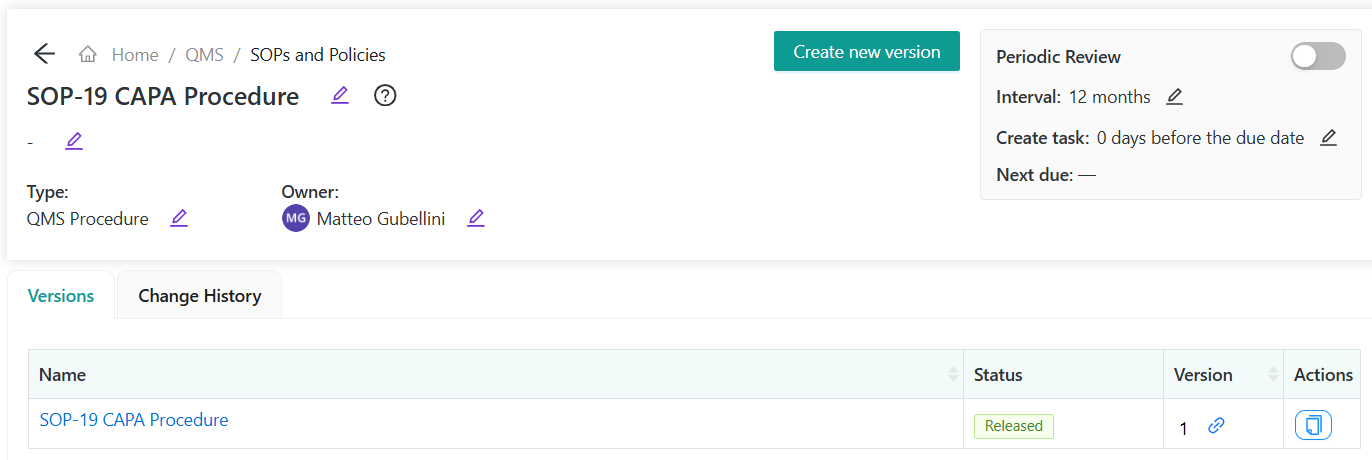
The settings include:
-
Interval: the number of months between reviews.
-
Create task: how many days before the review due date the app should create a task.
-
Next due: the calculated date of the next periodic review.
This lets you apply review schedules appropriate to different documents, rather than managing every document against the same timetable.
The next review date is calculated by adding the configured interval to the later of the latest version’s release date and the most recently completed periodic review.
For example, a document released on 1 June 2026, reviewed on 6 September 2026, and assigned a 12-month interval will next be due for review on 6 September 2027.
Automatically assign the review to the document owner
A review schedule only helps if someone acts on it.
SoftComply Document Manager automatically creates the periodic review task at the configured time and assigns it to the document owner. The task appears in their dashboard alongside other assigned work.

This gives the owner a clear action without requiring the quality team to maintain a separate review spreadsheet and manually assign each review.
If another person is better placed to assess the content, the current assignee or a user with Edit privileges can reassign the task.
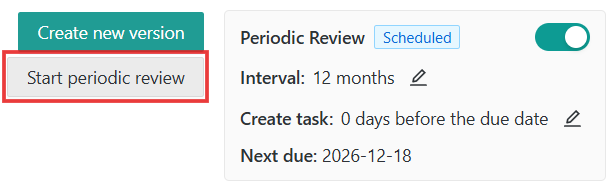
The periodic review panel also displays whether the review process is inactive, active, triggered or overdue, helping users identify documents that need attention.
Record the outcome – even (especially!) when nothing needs changing
A document review does not always require a new revision.
A procedure may still accurately describe the process, assign the right responsibilities and provide suitable instructions. In that case, the useful evidence is the recorded decision that no change is needed.
SoftComply Document Manager supports two completed review outcomes:
No change required
The review outcome is recorded, and the next review date is recalculated.
This distinguishes a document that has been checked and remains suitable from one that has simply been left untouched.
New version required
The review outcome is recorded, and the next review date is recalculated. If a draft does not already exist, the app creates one so the update can begin.
The revision must then follow the applicable review, approval and release process. Completing the periodic review records the assessment; it does not mean the required changes have already been approved and released.
Review earlier when something changes
A scheduled review provides a regular checkpoint. Changes may require an earlier assessment.
For a medical device team, possible triggers include:
-
A complaint investigation that identifies unclear instructions.
-
A corrective action requiring a process change.
-
A new development or testing tool.
-
A change in supplier arrangements or responsibilities.
-
New information affecting a risk management process.
SoftComply Document Manager lets users manually trigger a periodic review, creating a review task without waiting for the scheduled date.
This helps teams combine planned document maintenance with timely responses to changes.
Keep review history with the document
When preparing for an audit or an internal assessment, teams need to understand how their documents have been maintained.
SoftComply Document Manager records periodic review activity in the document’s Change History. Its Change History macro displays document history, including periodic review information, within the Confluence document.
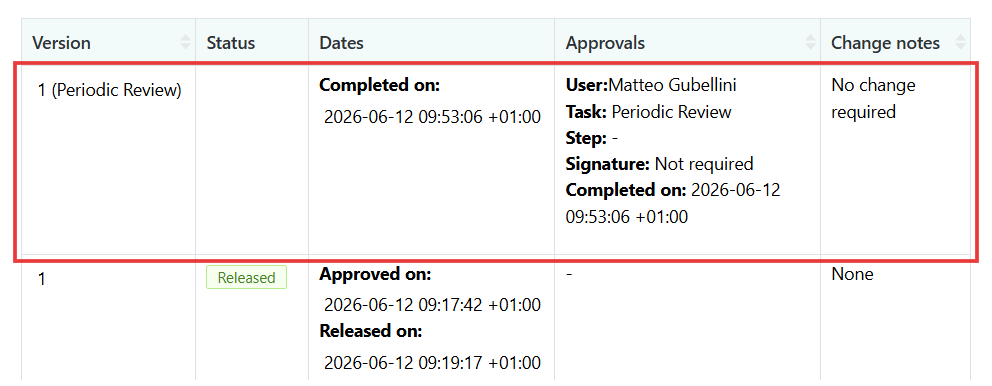
This makes review information accessible alongside the content, reducing the need to reconstruct the history
Try SoftComply Document Manager free on Confluence Cloud or Book a Call to learn more.