


Risk management is a critical part of product development and QA, especially in regulated industries where every feature must meet strict safety and compliance standards.
Yet, as teams move faster in agile environments, managing the connection between risk and testing often becomes messy or manual.
What if your risk management and testing were seamlessly linked inside Jira Cloud, ensuring that every identified risk is covered by a test, and every test traces back to a business-critical or safety-critical requirement?
That’s exactly what SoftComply and Xray bring together.
With this integrated solution, you can manage your risk-based testing strategy directly in Jira Cloud, combining structured risk control with powerful test management in one place.
5 Key Benefits of Risk-Based Testing
- Complete Traceability – Link risks, mitigations, and test cases between SoftComply and Xray to ensure no critical issue is left untested.
- Risk Coverage Visibility – Instantly see which risks are already mitigated and which still require testing.
- More Efficient Test Prioritization – Focus testing efforts where the risk is highest, optimizing resources and reducing testing overhead.
- Compliance Made Simple – Generate audit-ready documentation directly from Jira Cloud for standards such as ISO 13485, ISO 27001, FDA 21 CFR 820, etc.
- Integrated Workflow in Jira Cloud – No tool-switching. Risk management, test execution, and reporting all happen where your teams already work.
Challenge the Risk-Based Testing Solves
Teams developing safety- or security-critical software, whether in medtech, fintech, or enterprise SaaS, face a growing challenge:
- Risks are often assessed in spreadsheets or external tools,
- Test cases are managed separately in Jira, and
- Traceability between the two gets lost.
This disconnect not only slows compliance but also increases the chance of missing a critical risk during testing.
Centralized risk-based testing solves this by unifying risks, requirements, and test coverage in one place, allowing teams to prioritize verification where potential failures carry the highest impact. The result is more efficient testing, stronger traceability, and greater confidence in every release.
Overview of the Risk-Based Testing Solution
The integration between SoftComply Risk Manager Plus and Xray Test Management for Jira Cloud enables seamless alignment between risk management and testing activities.
SoftComply Risk Manager Plus
A risk management app purpose-built for regulated product development in Jira Cloud. It offers configurable risk models, automated scoring, impact assessment, and traceable risk mitigation planning aligned with standards such as ISO 14971, ISO 27001, IEC 62304, etc.
Xray for Jira
A complete test management solution that enables teams to plan, execute, and report manual and automated tests directly in Jira, ensuring quality and coverage across releases.
Together, the apps allow teams to link each risk control or mitigation defined in SoftComply to test cases and results in Xray, closing the loop between risk assessment and verification.
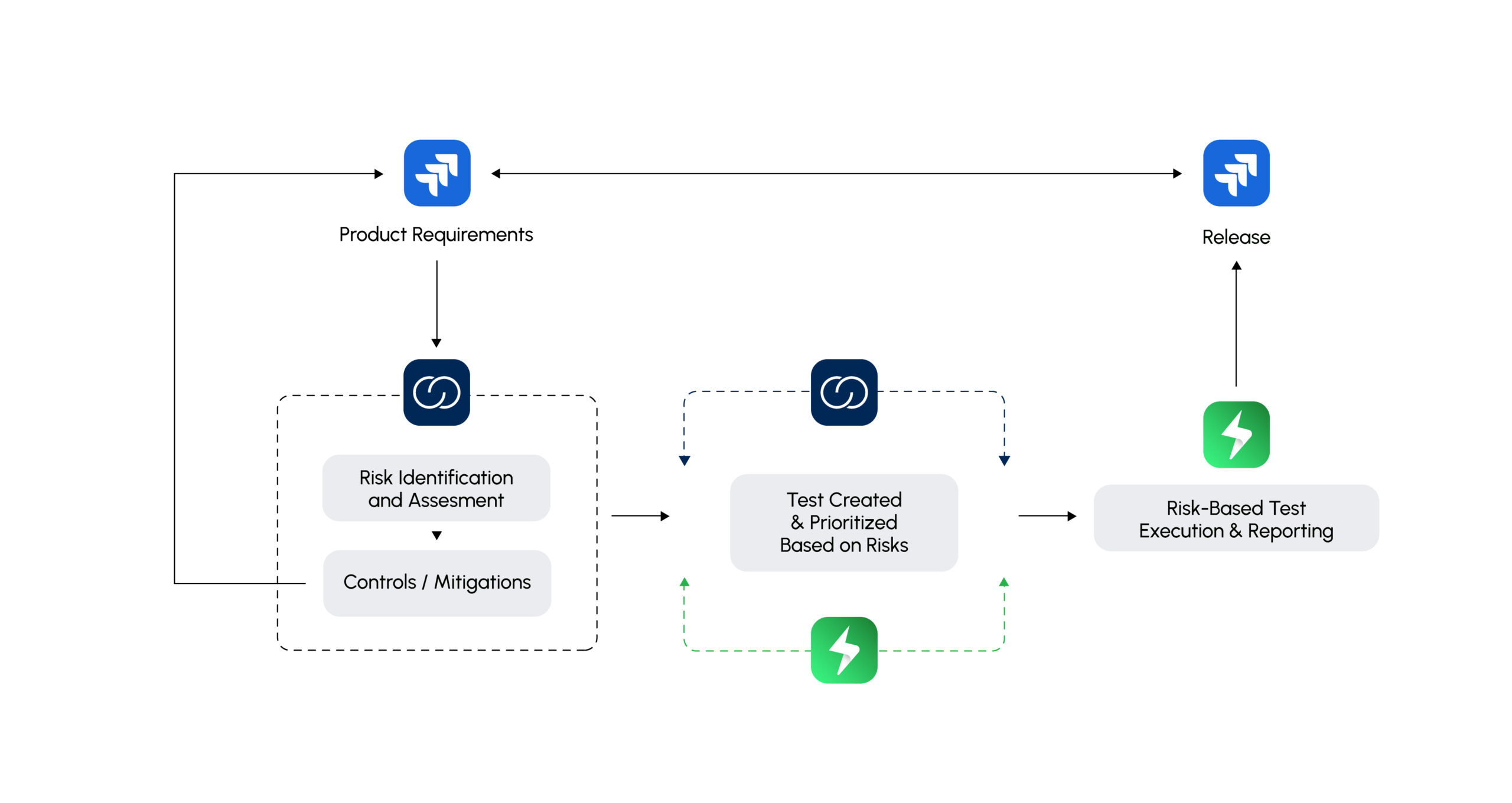
Risk-based testing is a structured testing strategy that focuses effort where failures would matter most. Instead of treating all requirements equally, testing is prioritized according to the likelihood of failure and the impact such failures would have on users, safety, or the business.
- Identify and assess risks
Risks are derived from product requirements, system design, historical defects, and known failure modes. Each risk is evaluated for its likelihood and impact, creating a ranked list of what could go wrong and how severe the consequences would be.
- Prioritize tests based on risk
Test plans and test cases are generated to address the identified risks. High-risk features, integrations, and scenarios receive the highest priority, ensuring they are tested first and in greater depth. This links risk controls to concrete verification activities.
- Make release decisions based on risk-based test results
Release decisions are then made by combining the risk-based test results with the product requirements and acceptance criteria. Unresolved high-risk issues highlight release blockers, while mitigated or reduced risks support confident release decisions.
By aligning testing effort directly with risks, teams make more efficient use of limited time and resources, increase transparency, and significantly reduce the likelihood that critical issues escape into production.
How the Risk-Based Testing Solution Works in Jira
Following is a step-by-step guidance on how you can prioritize tests based on risks in your Jira projects. You can also check it out in our YouTube video:
1. Define & Assess Risks – Use SoftComply Risk Manager Plus to create and assess risks according to your chosen model (e.g., probability × impact).
Set up the risk assessment model for evaluating your risks. When doing it, also map your risk scores to custom fields – this will later allow you to use JQL filters when prioritizing tests by risks.
In this example, we mapped the Initial Risk score to a custom field called “Inherent Risk”. For mapping your risk fields to custom fields, please use this guide. Remember to add the custom field to the issue screens in the Jira configuration.
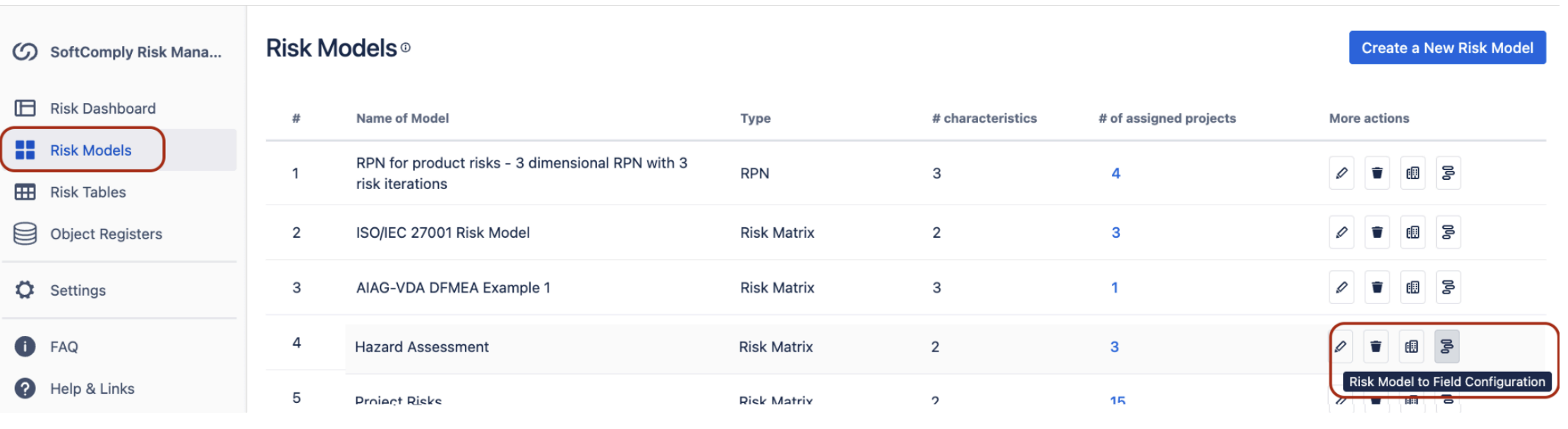
Figure 2 – Custom field configuration of Risk Values with SoftComply Risk Manager Plus in Jira Cloud
2. Establish & Link Risk Mitigations – Identify risk mitigations or controls, i.e. requirements that help lower the risk, and track their implementation status.
Create new requirements that mitigate the identified risk inside Jira and link them to the risk in the Jira issue view by “mitigates” link type. Alternatively to linking mitigation actions manually to risks, you can use the risk table view of the Risk Manager Plus and add the requirement to the Mitigation Links column that automatically will create a link between the risk and the mitigation action with the type of “is mitigated by”.
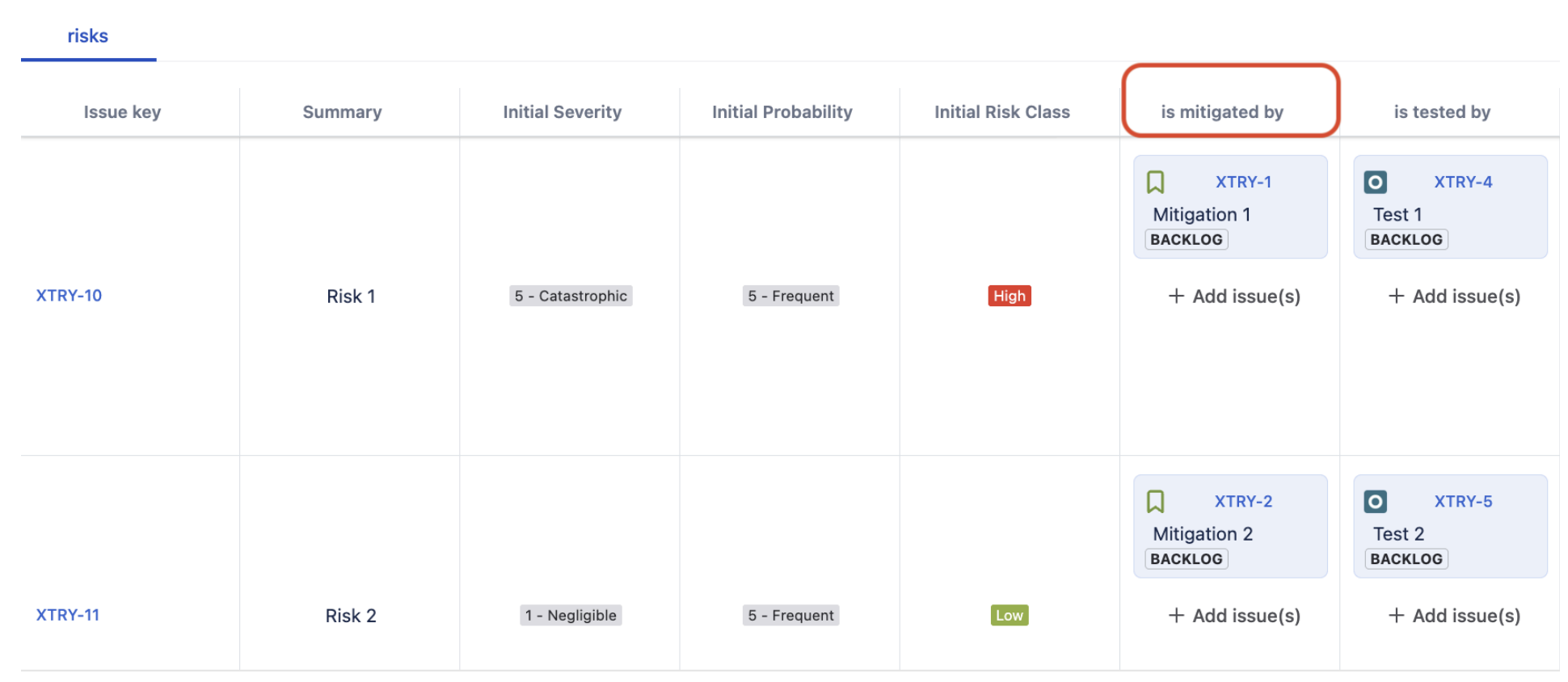
Figure 3 – Identifying Risk Mitigations/Controls and Verifications/Tests in Risk Manager Plus on Jira Cloud
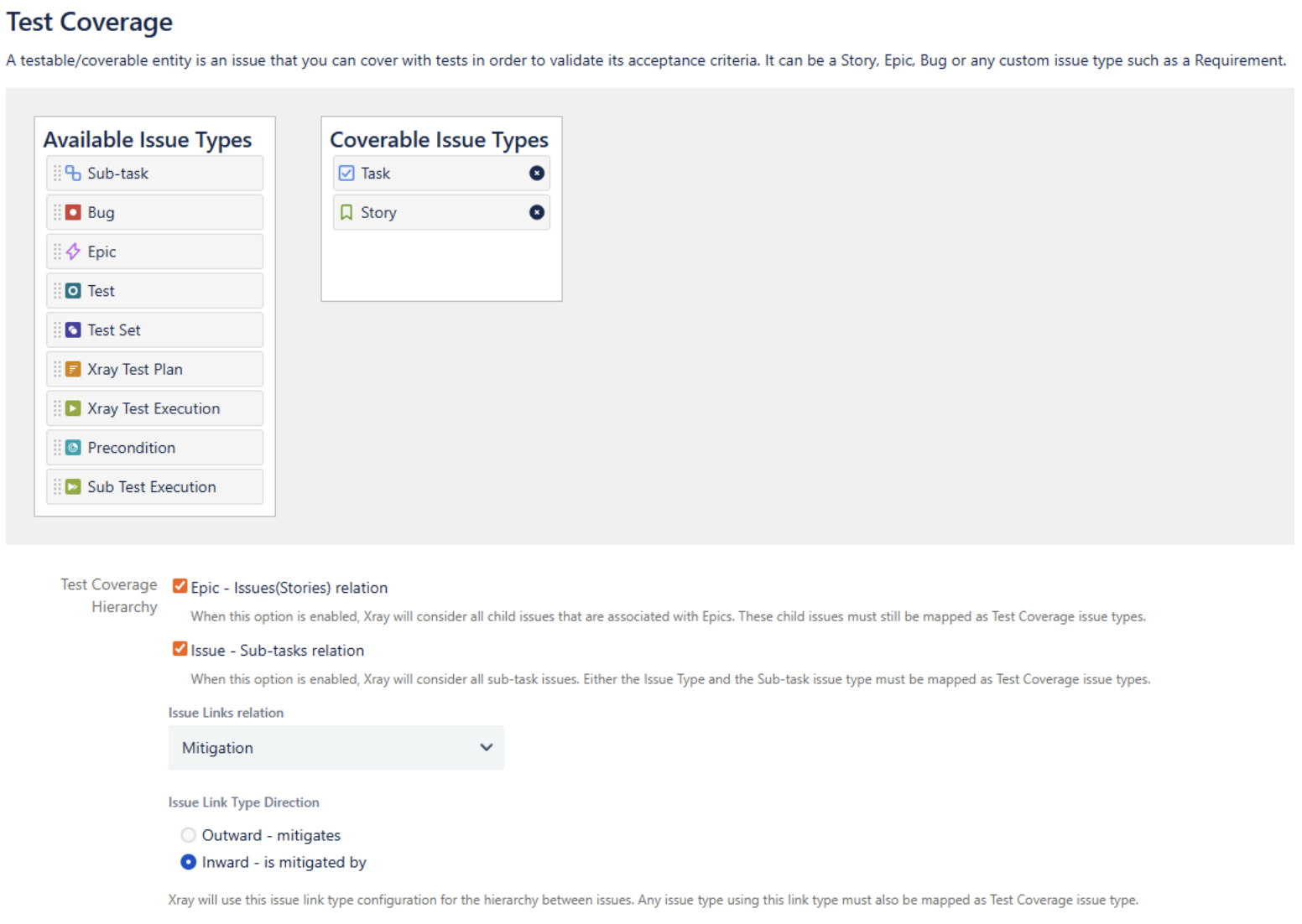
3. Configure Xray in your Space Settings – as a prerequisite to finding the test cases linked to your high risks, it is important that you have configured the Test Coverage in Xray settings of the Jira space.
For that, go to Space Settings -> Apps -> Xray Settings -> Test Coverage tab specifying the following:
- The Coverable Issue Types. In the example Jira space, we have Tasks (representing Risks) and Stories (representing Mitigations)
- the Issue Links Relation type as “Mitigation”, and
- the Issue Link Type Direction as “inward”:
4. Establish & Link Test Cases – connect verification actions to your mitigation actions by adding one or more Xray tests directly within Jira.
When creating a new test, remember to link it to the Mitigation action (Requirement) by “tests”/”is tested by” link type inside Jira. You can do so directly in the Jira issue view of the requirement.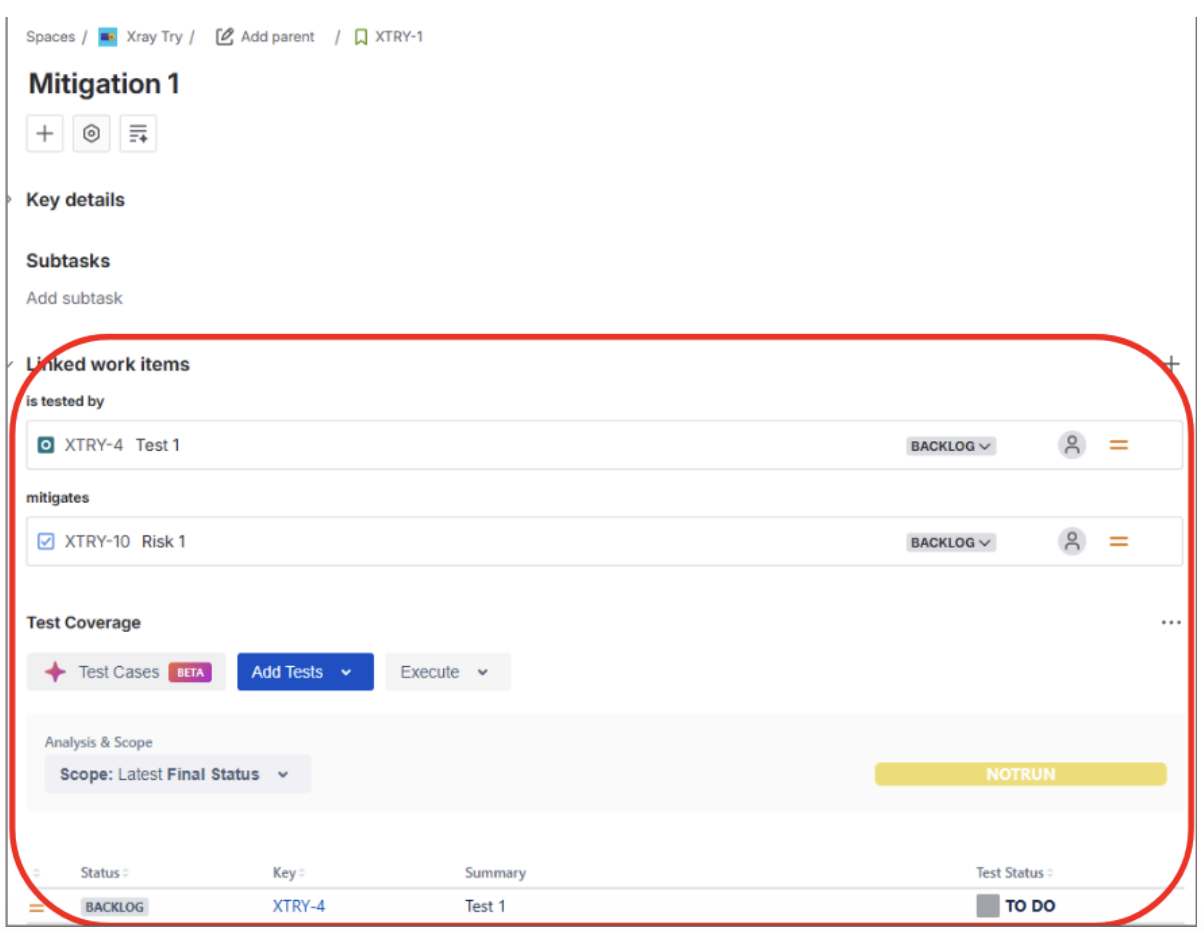
Figure 5 – Linking test cases to verify mitigation actions
5. Prioritize Test Cases – Filter the test cases in Xray that are linked to the most critical risks as defined in SoftComply Risk Manager Plus:
In order to find the tests that are linked to risks with a high risk score, you will have to leverage JQL in 2 stages.
First, you will need to find all the risks in a specific project that have a high risk score. To do that, we used the following JQL search:

Make sure to save the filter (we named this “Xtry High” in our example) and set the permissions so that everyone can view and edit it, which is important when using the filter afterwards.
Next, we use Xray’s JQL function “requirementTests” to find all the tests in the project that are linked to risks with a high risk score. In other words, we embed the first filter into the JQL function.
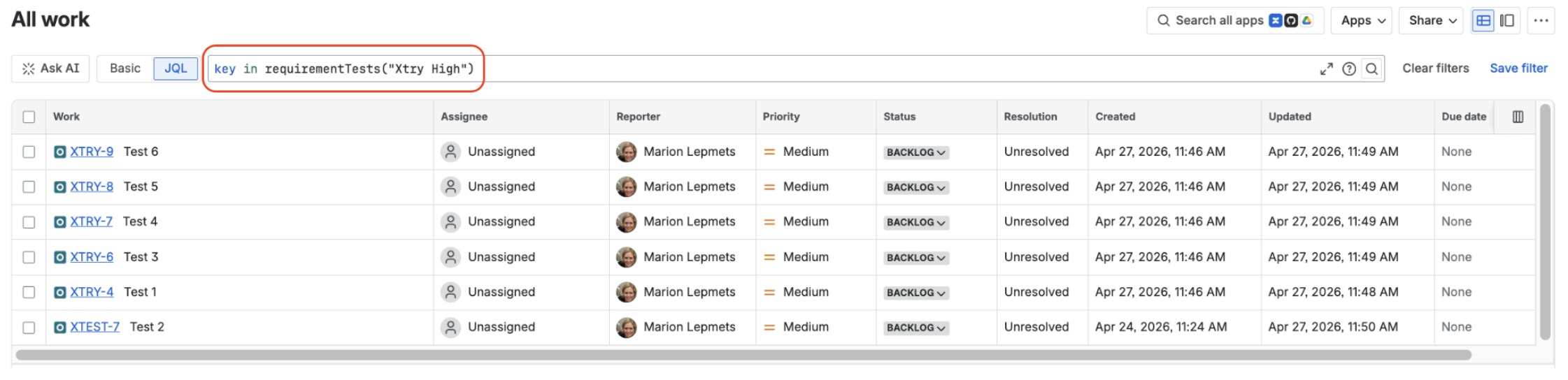
6. Execute Tests in Xray – Perform test runs and review results: create a Test Execution, assign the prioritized tests using the previous JQL to the Test Execution, and report results for each test.
7. Monitor Coverage & Compliance – Combine dashboards from the Risk Manager Plus with Xray reports to visualize which risks are fully verified, partially mitigated, or untested. The Test Coverage and the Requirement Traceability reports provide a clear overview of the status of the risks and their mitigations based on the testing results.
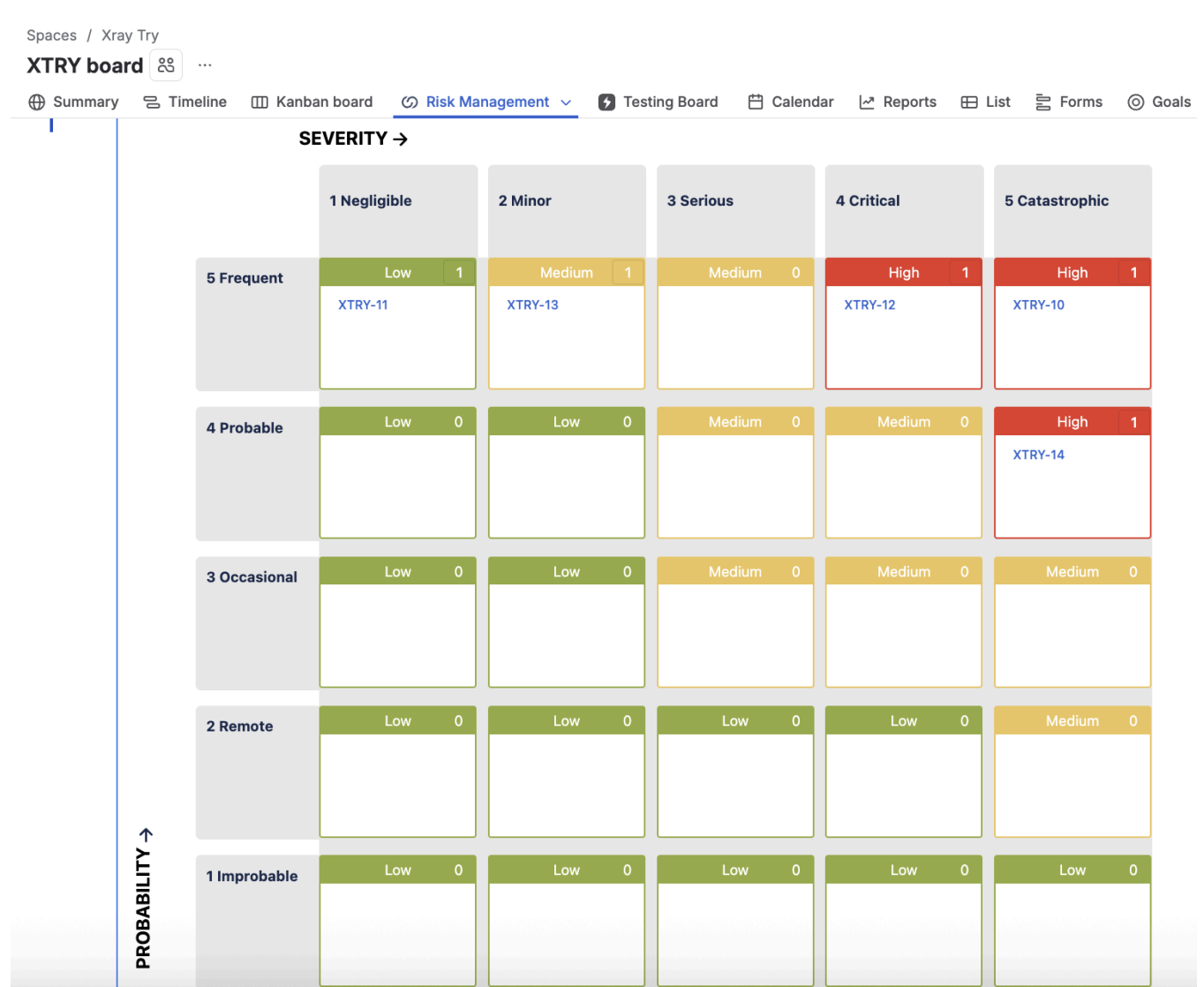
Figure 8 – Risk Matrix Report (SoftComply Risk Manager Plus)
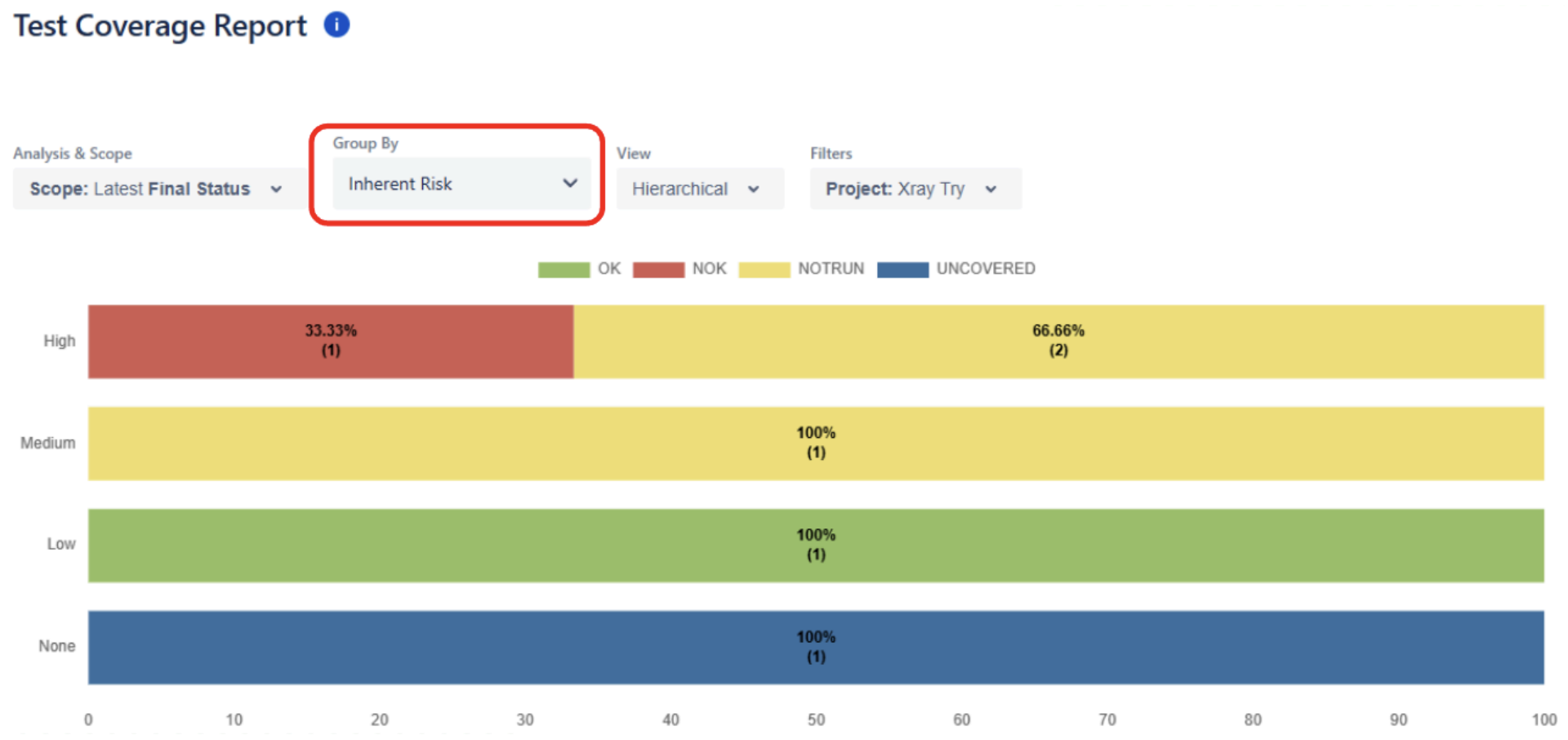 Figure 9 – Test Coverage Report (Xray)
For additional resources check how to perform risk-based testing with Xray.
Conclusion
By combining SoftComply and Xray, development teams can confidently demonstrate that testing activities are risk-driven, compliant, and traceable — all within Jira Cloud.
Teams often report reductions of 20-40 % in test planning effort and a notable decrease in audit preparation time after implementing integrated risk-based test-traceability workflows.
Industry studies show up to ~50% test effort reduction when risk-based methods are applied.
In short:
This integration transforms Jira Cloud into a risk-aware quality management environment — ensuring that what matters most gets tested first.