


REGULATORY REQUIREMENTS & THE CHANGE HISTORY APP
You are all set up – your development team is working in Jira and your Quality Management System is set up in Confluence. You are getting input from your colleagues and your documents are being approved electronically. Everything is working perfectly.
Time to audit your QMS. You export your documents into PDF to prepare them for the auditor. And you realise only then that the printed documents do not show all the necessary information that makes a Confluence page into a controlled document. Although the approval information is electronically stored and accessible, it is not displayed on the page.
One of the most important requirements of electronic signatures for safety critical industries is the need to report certain information on the document itself. This requirement extends to any PDF export for submission to the applicable regulatory agencies and Notified Bodies.
In Confluence Cloud there are several apps that can be used for electronic signatures. We typically recommend Comala Document Management paired with Comala Publishing. They offer a good level of customisation and compliance, including a very detailed audit trail for each page. This audit trail is very comprehensive (as it should be) but not easily consultable after a few approval rounds and it cannot be easily exported.
We are happy to introduce the SoftComply Change History app to you for capturing and displaying your document approval history from Comala Document Management onto your Confluence pages in order to make your documents audit-ready.
This app adds a customisable Change History table to any Confluence page provided you are using the Comala Document Management app. This can then be exported using the built-in or any other PDF exporter.
Excerpt from 21 CFR 11 & how the SoftComply Change History app meets these requirements:
| REQUIREMENTS | DESCRIPTION | COMPLIANCE |
| § 11.50 Signature manifestations | ||
| § 11.50 (a) | Signed electronic records shall contain information associated with the signing that clearly indicates all of the following: (1) The printed name of the signer; (2) The date and time when the signature was executed; and (3) The meaning (such as review, approval, responsibility, or authorship) associated with the signature. | The SoftComply Change History table includes all the required information: (1) The full name of the approver, as defined in the Atlassian account; (2) Each action is associated with the timestamp generated by the Comala workflow history; (3) The table includes the name of the Workflow State, the Approval name and the name of the Action. |
| § 11.50 (b) | The items identified in paragraphs (a)(1), (a)(2), and (a)(3) of this section shall be subject to the same controls as for electronic records and shall be included as part of any human readable form of the electronic record (such as electronic display or printout). | The information used by the SoftComply Change History table comes from the Comala Document Management audit trail (workflow history), which is embedded in the Confluence page.The table appears in the PDF export from Confluence. |
| § 11.70 Signature/record linking | ||
| § 11.70 | Electronic signatures and handwritten signatures executed to electronic records shall be linked to their respective electronic records to ensure that the signatures cannot be excised, copied, or otherwise transferred to falsify an electronic record by ordinary means. | The information used by the SoftComply Change History table comes from the Comala Document Management audit trail (workflow history), which is embedded in the Confluence page.Any additional data generated by the app is embedded into the Confluence page.When a page is copied using the Confluence copy feature, the data related to the electronic signatures remains with the original document. Exception is when the document is Published using the Comala Publishing function. In this case, the information is passed to the published document too. |
WHAT IS CHANGE HISTORY?
The goal of keeping a change history is to highlight the main differences between the previous version(s) of the same document. It is also important to have the information about the date from which this instruction/procedure is valid or effective and who has signed it off and when. Change History summarises the evolution of a document throughout its lifetime (and even beyond as you will also mark the obsoletion in the Change History table).
Until today, you had to fill in the Change History table manually on your documents in Confluence. Typing in the notes and the version numbers is relatively easy, but displaying your electronic signatures on the Confluence pages had not yet been automated. Now you can use the SoftComply Change History app to automatically display your document approval history on your Confluence pages.
HOW DOES THE SOFTCOMPLY CHANGE HISTORY APP WORK?
Install the Change History app
First, install the SoftComply Change History app from Atlassian Marketplace.

Configure the Change History app
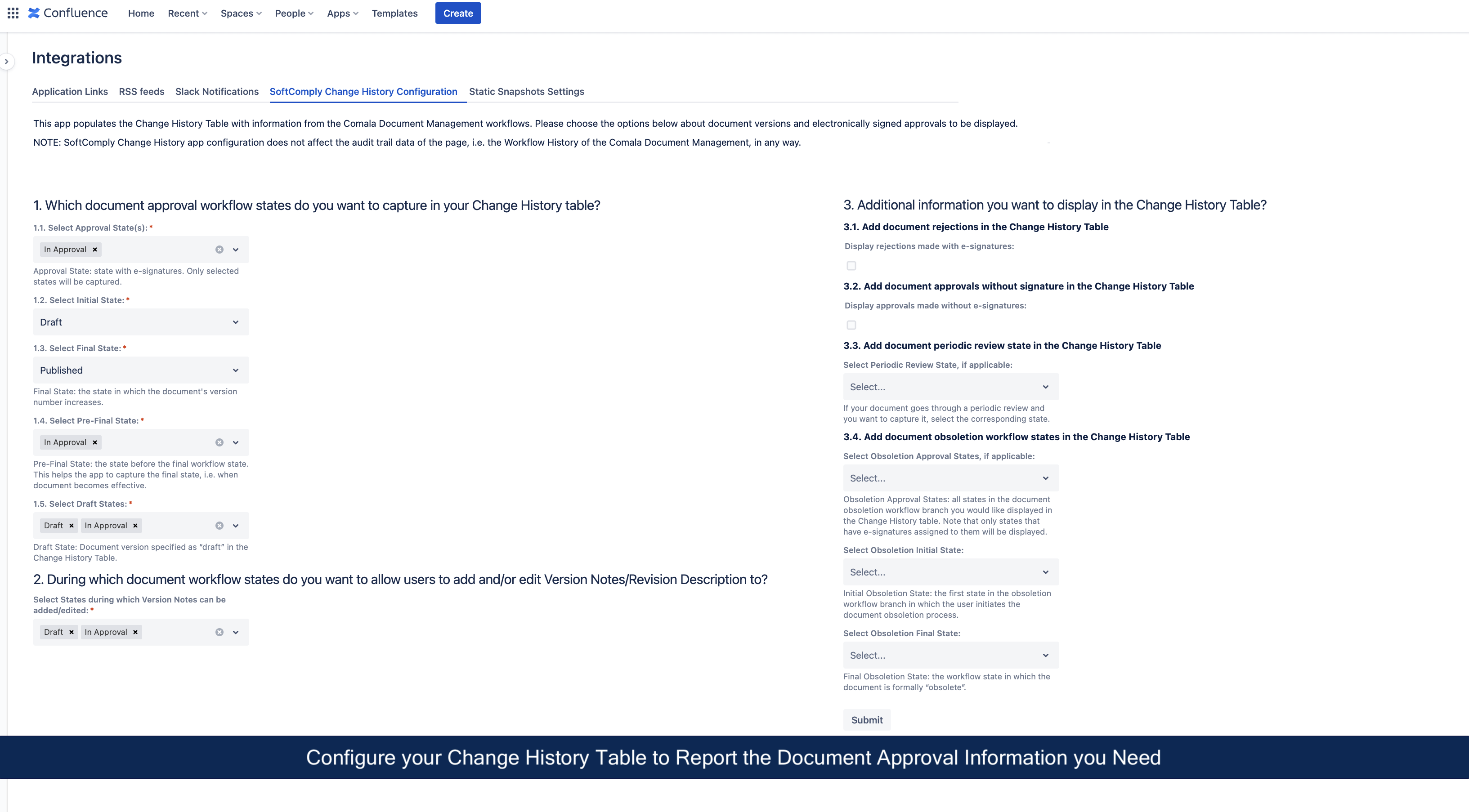
Next, configure the SoftComply Change History app to display the information from the Comala Document Management workflows that you wish to see in the Change History table on your Confluence page. Follow the user guide to get the most out of the configuration options.
Add the Change History Macro to your Confluence Page
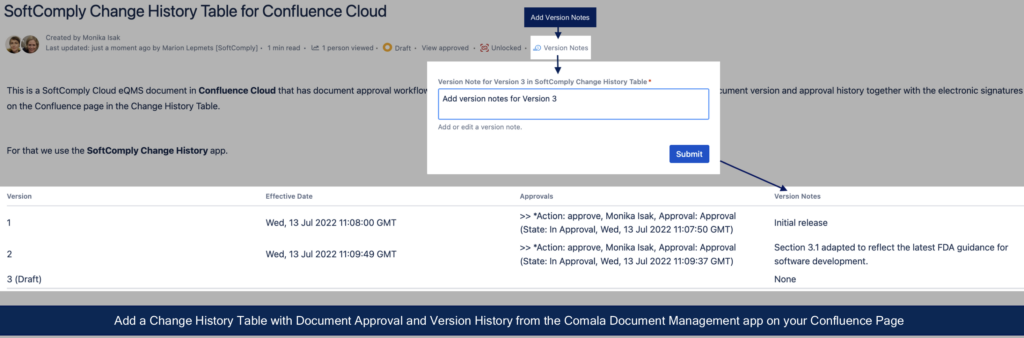
Once the configuration is done, simply add the Change History table macro to a Confluence page (type in “/” followed by “SoftComply Change History”) and select the respective macro from a list. You will now have your document version and approval history from the Comala Document Management displayed on the Confluence page!
WANT TO LEARN MORE?
To learn more about the SoftComply Change History app, try it out for free for a month, schedule a demo call with us & check out the user guide of the app.